
Activating subscriptions via Use Code
To access your DISPL Content Management System you need to have an activated subscription.
You can acquire subscriptions by two means: 1) subscribing to Displayforce Manager in your CMS, or; 2) by activating a key (this article).
One key is provided for both one and several devices. Thus, only one key can be used to activate one subscription type for a group of devices.
An Activation key is an encrypted alphanumercial code such as follows:
«5UGBGEDRD8K8LMAE» (for example only).
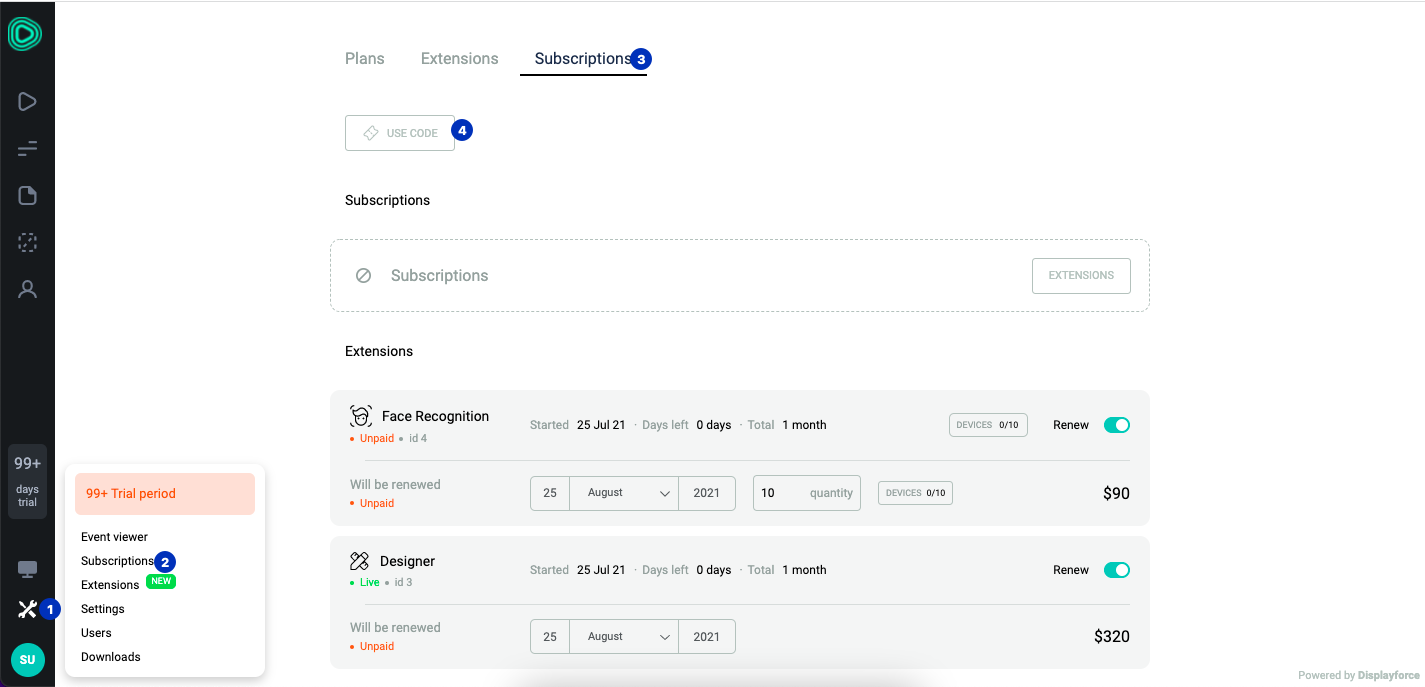
You can activate your key following these instructions:
- In your CMS access the Settings;
- Select Subscriptions section;
- Click the Use code button;
- A pop-up window shows, please enter your key, day of subscription start and click Activate;
Done!
After code activation a pop-up notification will appear. It contains information about type and period of the subscription and number of devices that can be activated with it.
Comments
0 comments
Please sign in to leave a comment.