
Installing DISPL Player on Android
To download Displayforce Designer and Displayforce Player:
1. Log in or create your DISPL CMS and get access to your platform.
2. In DISPL CMS Manager in the lower left corner, click on the "Settings" button and select "Downloads".
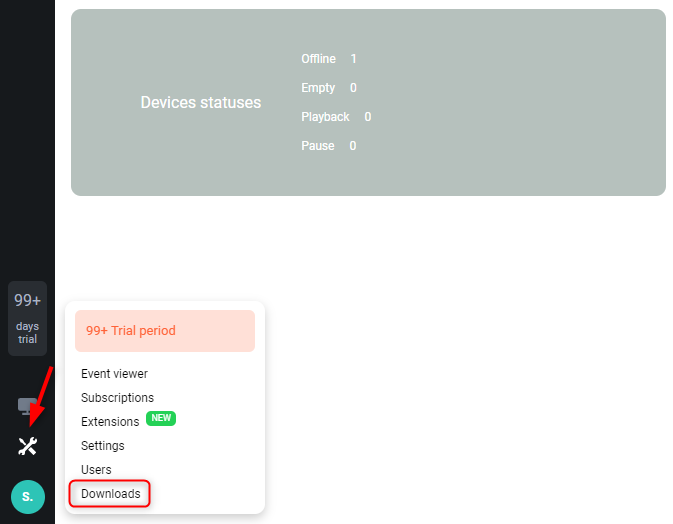
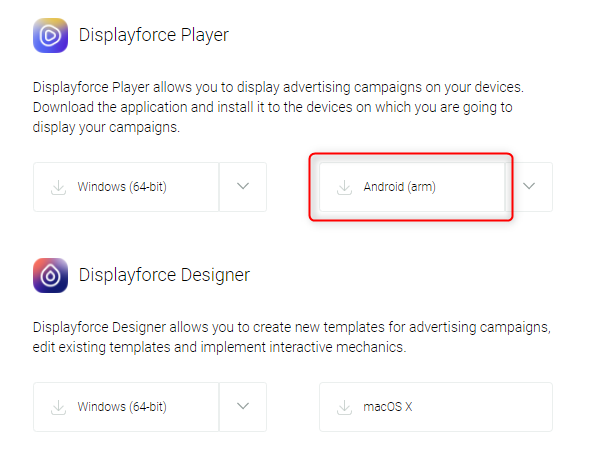
3. In the opened window, you can download DISPL Player for Windows, Android and macOS.
Note! In most cases, the installation package for Android devices should be downloaded by clicking on the "Android (arm)" button.
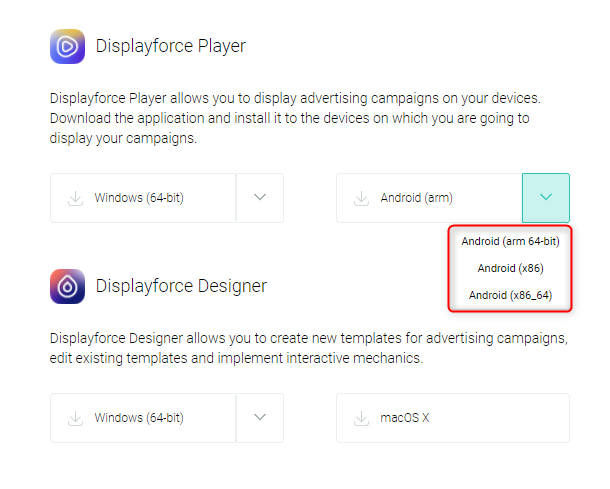
If your Android device has alternative processor options, then you can download an adapted version of Displayforce Player by selecting it from the dropdown list.
Before installing the program, make sure that the media display device meets the system requirements, then open the folder containing the program distribution.
To install DISPL Player on an Android-based device, follow these steps:
- Download the distribution (Player.apk) from the URL provided. Wait until download to device is complete.
- Open the device security settings (Settings/Personal/Security).
- Uncheck the "Check apps" box.
- Check the "Unknownsources" box.
- Open the "Downloads" folder (Settings/General/Memory /sdcard/Download/).
- Launch Player.apk.
- Click "Install" in the dialogue window.
- Wait until the installation is completed.
The DISPL Player program will be installed.
Comments
0 comments
Please sign in to leave a comment.